Tuesday, June 16, 2009

Instrumenting Menus

A week or so ago I was asked about tracking menu hits in the Visual FoxPro application I am working on for a client. This application is vintage late 1990's so there is no single procedure/object to process menu hits. Each pad/bar has it's own little procedure that run some code. So, I did what I do anytime I am asked to implement something new... I googled it. I found a wonderful article titled Instrumenting FoxPro Applications by Rod Paddock. It was written in 1997. So, the article confirmed what I already knew, I was in trouble because there was not a central menu execution object in this application.

Next I stumbed across the Extending the VFP 9 IDE with MENUHIT and MENUCONTEXT article by Doug Hennig. Ok, so first of all, Intellisense is available at runtime now. I spoke on this a while back. Next, intellisense has exposed "generic" menu events. So, I should be able to use this to instrument my menu without adding code to each menu item. Yes I could! Here is how I did it:

  1. I opened my FoxCode table and copied it to the application's data directory and deleted all of the records.

  2. I added one new record to the application specific FoxCode table with the following field values:

    Type = 'S'
    Abbrev = 'MENUHIT'
    Data = The following program code.


    LPARAMETERS ;
    toParameter

    LOCAL ;
    loSelect AS Object, ;
    lcBar AS Character, ;
    lcPad AS Character

    loSelect = CREATEOBJECT('cSelect')
    lcBar = UPPER(ALLTRIM(toParameter.MenuItem))
    lcPad = UPPER(ALLTRIM(toParameter.UserTyped))

    *!* do not track use by developers
    IF VERSION(2) <> 0
    RETURN
    ENDIF

    SELECT 0
    USE MenuTrack
    LOCATE FOR UPPER(cBar) = lcBar AND UPPER(cPad) = lcPad

    IF NOT FOUND()
    APPEND BLANK
    REPLACE cBar with lcBar, cPad with lcPad
    ENDIF

    REPLACE nCount WITH nCount + 1, ;
    dLastHit WITH DATETIME()

    USE IN SELECT("MenuTrack")


  3. Then, in my main program I added the following lines of code:


    IF FILE(‘FOXCODE.DBF’)
    _FOXCODE = ‘foxcode.dbf’
    ENDIF


It works beautifully and now we are able to track which menu items are called and which ones are called most often. Thanks Rod and Doug!

Friday, May 01, 2009

Mike & Toni Feltman Speaking at Southwest Fox 2009

Speaker announcements were posted for Southwest Fox 2009 today and I'm pleased to announce that Toni and I will both be speaking at Southwest Fox. If you've seen us speak before then you know that Toni is one of the best speakers around and that conference organizers can save on hotel expenses by also having me speak. 

I'm really excited to be speaking this year and have two fun topics that I think will translate into great sessions. The first one is HTML and Visual FoxPro and the second one is Introducing  ChatterFox

The HTML and Visual FoxPro session is a two parter. First I'm going to go over all of the HTML related features that come in the box with VFP. There's a lot of them and there's not one central object or command that they're based on, so it's easy to miss some off them. There are also a lot of language features that aren't HTML specific but that make it easy to both create and consume HTML in VFP. We'll cover that as well. In the 2nd part, we're going to take a look at using HTML in desktop applications. HTML isn't just for the Internet and I'll show you why in this session. 

My other session, Introducing ChatterFox, is about some APIs I've been developing for enabling social media like features on custom web sites as well as in desktop applications. The abstract on the SW Fox site pretty much tells the whole story on that session, so head over there for all the details. While you're there, click on the register link and get yourself signed up. There are some great early discounts available. 

Also, on the topic of SW Fox, a new track has been added this year: "Technology for VFP Developers." A brilliant and wise man suggested this topic to the SW Fox organizers although I'm sure plenty of other people had the same thoughts. This track covers subjects that are not specific to VFP but that VFP developers will benefit from by knowing. Here are the topics in the track:

  1. Integrating VFP with SourceGear Vault
  2. Introduction to Subversion and Tortoise SVN
  3. Microsoft Virtual PC for VFP Developers
  4. Open Source Tools
  5. The Show Must Go On: Disaster Recovery and Business Continuity Planning
I think this track is important for several reasons. First of all, the majority of VFP developers have been working in VFP for over a decade and would be classified as experts in their field. Sometimes it's hard to justify training expenses for something you're already an expert on. (My xBase career is at 22 years now and there are indeed sessions in this conference that I know I can learn from though) . So this track provides some training on other topics of interest that will benefit VFP developers directly even if you already "know it all" as far as VFP is concerned. Secondly, a lot of VFP developers live in their own little world. It's pretty typical for a VFP developer to be either an in-house developer that maintains a single line-of-business application or that has a fixed set of clients. This is a chance to look out the window and see what other VFP developers are doing out there. 

I'm looking forward to the "Microsoft Virtual PC for VFP Developers" session by Doug Hennig. I know I should be making use of virtual machines but everytime I decide to give it a whirl I run into some show stopper and decide to get back to billable work. I'm counting on Doug to get me up and running eh. 

If you're not using Source Code Control, well, I think you need to question your sanity. I thought F1 Technologies was somewhat late adopters of source code control when we finally started using it in the 90s. I'm shocked and appalled that there are still developers out there that I consider highly skilled and otherwise brilliant not using version control. There are 2 sessions in this track for you. Introduction to Subversion and Tortoise SVN given by Toni Feltman and Integrating VFP with SourceGear Vault by Walt Krzystek. Subversion and Vault basically represent both schools of thought in Version Control. If you don't know what I mean by that, go to the sessions to find out. Then pick one! Both of them are precons, so if you register now, you can attend one of them for free. If you can't justify the expense for the 2nd precon, just go to Toni's session - Toni is way better looking than Walt. If you are using version control, if you're using VSS (or VSS with Source Off Site) and like that approach go to Walt's session on Vault and see all that you'll gain by switching to Vault. If you find Vault or VSS too prohibitive or you just want to see what Subversion is all about, go to Toni's session. 

I'll be rehearsing one of my sessions at the Grand Rapids Area FoxPro User Group on October 10th. If there's a user group out there that would like to see me rehearse the other topic or both in September let me know. Practice makes perfect. 

Anyway I'm really excited about SW Fox this year. SW Fox is the only major VFP event in North America and I'm looking forward to seeing as many of my VFP friends as possible. Hopefully Toni and I will have the party room again this year. While I can't promise there'll be any burning guitars this year I'm sure it'll be a good time. Maybe Craig Boyd will get his act together and organize a real Texas Hold 'em Tourament.


Wednesday, April 29, 2009

Work Area Manager - Go Green with VFP

At my onsite gig I'm maintaining a VFP app that's been ported from FoxPro DOS to FoxPro Windows to VFP. It has a lot of old code in it, that suffice it to say, is suboptimal. Introducing new, well-written code into it is often challenging. The old code includes very little defensive coding and is full of assumptions about the environment it runs in. It's really dependant on what cursors are open, filters, indexes, record pointers and so on. The app is modal and there's a lot of "drill-down" type behavior, so things that the environment is depenendant upon may have longn ago in the call stack. After a lot of messing around with hard coding specfic states I needed to save and restore I finally decided to just create a class that would handle this stuff for me. If you remember the cSelect class from Codebook or VFE this is basically just an extended version of it that handles all open work areas. There's nothing complex about it, so I'm not going to get into the specifics of the code here. 

In the zip I've linked here, is a class named WorkAreaManager. Basically before you're going to do something that tampers with the environment, you just create an instance of it. Then you can go about your merry way messing with the open cursors, opening new cursors, whatever it is you need to do. When the instance is destroyed (either explicitly or by letting it's variable fall out of scope), any cursors that were not previously opened are closed and the record pointer, filter, index order and alias are restored for any cursors that were previously open. 

The only potential gotcha that I'm aware of is it doesn't handle temporary cursors if your code closes them, but that hasn't been an issue for me so far. 

Give it a try. 

Clean Bill of Health

I'm back home after my surgery. For the millions of readers out there who may not have been privy to the minute details of my health, let me summarize what's transpired. Back in March I had a tummy ache that persisted long enough for me to visit the ER. It turned out that I had diverticulitis and I ended up being hospitalized for 5 nights. Due to the outstanding healthcare I received from St. Vincent's Medical Center and the overwhelming support my family and I received from our friends and family the infection cleared up and I was able to avoid emergency surgery and was discharged. My hospital stay included 4 days of nothing but intravenous liquids, followed by a delicious diet of broth and jello.

Last week I returned to St. V's to have the bad section of my colon removed. The procedure I had was a Lathroscopic Sigmoid Recession for those that want to know the exact medical terminology. The end result is that my belly now looks likes this, except the bloating is down considerably. 

I'm recovering well. A few things still cause me considerable pain - including laughing, coughing and probably most importantly - pants. I think in another week or so I'll pretty much be back to normal. 

Overall, this has been a tremendously positive experience for me. The love and support I recieved from my friends and family here in Toledo was overwhelming and truly humbling. I've always felt tremendously blessed to be a Feltman and marrying into the Taylor-Hass family has really just made me even more blessed. The shawl in the picture was knitted for me by the Prayer Shawl Ministry at our church, Saint Martin de Porres and I was really blown away to receive it. We have a lot of people with much worse conditions than mine and I was really, really touched that they took the time to knit a shawl for me. An unexpected number of people took time out to visit, send cards and call with their well wishes also. I guess you never really know how much it means for someone to say they're praying for you or express their concern until you really need it. When you're sick, little things really do mean a lot.

So I'd like to take this opportunity to thank everyone for looking out for me, particularly my wife and children, my parents and in-laws, brother and sister, all of my friends on Twitter,  Aunt Marcia and Uncle Don and their wonderful daughters, Uncle Toby, my friend Scott, the Bumpus Clan, everyone at St. Martin de Porres and everyone else that had me in their thoughts and prayers. Your love and support really made this an overall positive experience for. Thank you all so much. It's really a great honor to know I am loved and cared for by so many. 

Going forward, I basically have to maintain a healthy diet. The other bright side of this is I've lost 23 lbs and since I was about at my all time heaviest when this happened, that's a real plus. I was planning on getting down to 200 lbs by August 22nd and now I only have 15 lbs to go. I'm sure there are better diet plans out there, but this one has worked great for me. With any luck I'll have a relapse after the 4th of July and I'll make it with basically no effort. :)

My energy level is still pretty low, but mentally I'm recharged and starting to get back into the swing of things. For my Fox friends in particular - who really rock and helped to keep Toni's spirits up tremendously -  I plan on paying it forward with some long overdue blog posts, some kick ass new features in VFE and rockin' sessions at SW Fox 2009. Look for the old, enthusiastic Mike of the early 90's to come out and dazzle you with some technical wizardry, self-depracating humor and of course - frantic pacing! Maybe I'll dust off the old Foundation Read sessions - those use to be real show stoppers. Hmmm, do I have enough time to regrow the mullet for SW Fox? I figure if I do really, really well, I can move up to 2nd to last in overall speaker ranking!

Again, thanks to everyone. You're all in my thoughts and prayers and you can count on me being there for you if you ever find yourself in a time of need. 

Thursday, March 26, 2009

How to get your VFP IDE windows to behave.

This fall I watched Alan Stevens present at the Southwest Fox conference and I really liked the way he had his Visual FoxPro IDE windows docked so when I got back home I tried it. The layout looks like this:

The problem that I had is the Visual FoxPro would not remember the position of the windows when exiting. Sometimes on startup it would be close but never totally correct. I asked Alan about it but he had never seen this behavior. 

Finally after several months I found the solution on Tek-Tips. The original solution can be found here (http://www.tek-tips.com/viewthread.cfm?qid=1515817&page=4). But the basic steps behind this thread are:

1. DELETE your Resource file 
2. Start VFP and SET RESOURCE ON 
3. Confirm using ?SET("Resource")
4. Very important step: click the button to the left of the Close (X) button so that the VFP IDE is not maximized
5. Open, position, size and dock your windows/toolbars the way you want them.
6. Quit VFP by clicking the Close button (X), not by choosing File - Exit.
7. Restart VFP and the IDE should be the way you want it.

You can now Maximize the IDE and when you restart everything will still be where you want it.

Friday, March 20, 2009

Don Macintosh

Today a friend of mine posted this comment on Twitter:

"Every so often I practice typing with my nose, just in case I lose my arms in some sort of accident. It pays to be prepared!!"

The comment immediately reminded me of a long time FoxExpress customer named Don Macintosh. Don would call me regularily for technical support. The support questions were really more about custom code than how to use the product. Our receptionists alway knew when it was Don before he identified himself because he was older and spoke louder than most of our other customers. I later found out it was because he was always using handsfree. He always started the call with "Hi, this is Don Macintosh." Because Don was older, it often took several tries to get my point across which at times could be frustrating. Even though I made sure to put on my happy voice, I didn't always enjoy talking to Don. But, Don always liked talking to me and never had any issues paying for the support he used. 

I don't remember the details of the application he was writing but I think it may have been church management software. What I do remember is that it was running on Chinese windows which was one thing that I found facinating about the application. He never had any questions about running under Chinese Windows. It just worked. His questions were all about FoxPro and FoxExpress.

One summer Mike and I were presenting at several of the Southern California User Groups and Don came out to meet us face to face at the.LA Fox User group. We knew Don was coming and it was going to be nice to finally put a face with the name. We got far more of a surprise than we ever expected. Don was indeed older. My guess was early 70s, which was ancient when I was not yet 30. However, he had very minimal use of one arm and no use of the other. I think that the proper term is Diplegia. He was accompanied by his lovely wife who was always nearby when we spoke on the phone. Before meeting him, I just assumed that a retired huband and wife spent a lot of time together. 

So, I bet you are asking how he could possibly program computer in the mid 1990's (before voice recognition was popular). Well, Don had a wooden dowel with him that he put in his mouth and typed with. He was unbelievably efficient, so efficient that I had no clue when I spoke to him on the phone. Sure, I thought some things took a while, but not that long. He was able to navigate the mouse just enough using his one arm. I was so shocked.

Don demoed his application for us and it was nicely done and pretty complex. Of course, our demo was using US Windows but he did show it to us running Chineese windows just so that I could see it. I left that user group meeting with a new respect for Don. When we got back to Toledo, I welcomed each and every call from Don and... I could hear the clicking of that wooden dowel as we spoke. 

Don finished his application and we moved on to other FoxPro technologies. I wonder what ever happened to him. I should remember Don more often when I open my mouth to say "I can't" 

Friday, February 27, 2009

Where did my FoxPro Application Go?

I have been meaning to blog about this for almost a year but kept pushing it to the back burner. A client of mine had an intermittent problem for quite some time. The problem occurred when the users would have the application running and switch to another window like FireFox or Outlook or even another instance of the application. When they would come back to the original application window, it would be gone. No error, just gone.

Once of the things that I did shortly after I started on this gig was to move the runtime files from the server to the local workstation. The system was already launched from a .BAT file that copied a bunch of junk to the local machine so why not copy something useful? As you might expect, in a company with close to 300 users at any time, this move reduced the network traffic quite a bit.

Once the runtime files were moved, we started getting intermittent (but frequent) "Invalid Seek Offset" errors. The network guys insisted that this was an application problem and I insisted that it was a hardware problem. After much Google searching, they network team finally conceded that this was indeed a network issue. It was several network issues actually, NIC cards, bad cables, overloaded hubs... So, my move actually helped make the network stronger.

Once the "Invalid Seek Offset" errors started, the disappearing application windows went away totally. Interesting... when a network connection (or drive mapping) is lost and VFP has to make a call to the runtime files located on a network share, it just shuts down because it can't find the necessary files. It shuts down gracefully with no error message. Sure, data in memory is not saved but no data becomes corrupt either.

On the other hand, Invalid Seek Offset errors are really bad. FoxPro's error handling does not trap these errors and once you get one, you are not getting out of it without an End Task which can corrupt data. So, which do you choose... High network traffic and low risk for data corruption or low network traffic and high risk for data corruption? Luckily this company chose to use the errors (as horrible as they were for a short time) to correct the network problems and make the infrastructure more sound over all. Now the system runs efficiently with next to no network related errors. I would never have expected FoxPro to just shut down when it couldn't find the needed internals.

Have a great weekend!

Friday, January 16, 2009

Chatty vs. Chunky

Most of my client-server experience has led me to believe that a chatty application will perform better than a chunky one. A chatty application will pull, from the server, the smallest amount of data needed to perform a task. If more data is needed for another task another small dataset is retrieved. It is an only pull what you need system.

While working at GiftRAP, Beth Massi, tried to convince me that a chunky interface is far more scalable and much better when writing distributed applications. Since Beth knows far more about distributed applications than I do I said OK but didn't really believe her. After all, I was always taught that smaller is better when it comes to getting data from your database server. Well, I now have proof that Beth may have been right, but don't tell her. :-)

I am working on a project right now that is experiencing some bottlenecks on our Oracle Server. Some of the long running processes are really blocking the other 250 users of the system. So, I have decided that I need to do what Calvin would do and remove the slow parts.

So, here is this process that scans through a FoxPro table and retrieves some data from two different Oracle tables based on the FoxPro key field. The first mistake the original developer made was to not create one query to get the data from both Oracle tables at once since they are related. No big deal, this is an honest mistake for someone not well versed in Client-Server techniques. So, I fixed that but the process was still very slow.

As it turns out, there were about 140,000 records in the one Oracle table and just over 3000 that matched a generic query needed for this process. The Oracle cost of the generic query was like 6703 and the cost of the query specific to the Fox data was 474. The problem is that the query with th 474 cost was executed in a loop more than 15 times. Therefore, it was significantly more efficient to pull all 3000 records down (a small # of fields) and let FoxPro filter the more specific data as it was needed.

In general the process would take anywhere from 15 minutes to 1 hour to run on a daily basis and consume enough server resources to slow down other processes. Now it runs in under a minute and is barely a bleep on the server's performance monitor.

Don't get caught in old habits when tweaking performance. Chunky can be better than Chatty even in non-distributed (or plain 2 tier) applications.

Note: Mike and I were discussing this post the other day and he indicated that the point of the blog might not be so evident. So basically here is the point in a nutshell: Pulling down 10 different records 5 times is not always faster than pulling down all 50 records from the start.

Friday, November 14, 2008

UAC Hell

I have spoken to several people lately about how I do not like running with UAC turned on under Vista. The concept of UAC is a good one; I just don’t like it for me so I keep UAC turned off. For some reason it seems that Windows wants to keep turning it on for no reason and without prompting. This has been driving me crazy for several months simply because when I turn it off I have to reboot and that takes a little while I my machine. I plan to do a “Freeman” very soon.

Well, last week UAC again got turned on without prompting. This time it was far worse than any other time. I noticed right away when I went to enter my password that the dialog was different. I just figured that whatever update turned UAC back on must have also changed the login dialog. Then, I figured out that my password did not work. I entered it the same way and the login dialog accepted it but I received a message that I needed elevation. How much more elevation can you get than the administrator? So, I went and looked at my user rights and guess what, I was no longer an administrator on my own computer. I was just a debugging user. To boot, I had no clue what the password would be for the Administrator account. All I read about Vista said that the Administrator account was not really one that could be logged on to. Just great!

After an hour or so of trying to figure out what was going on, I was reminded of a conversation I had with some networks guys I work with. I needed to install a specific version of MSXML on each workstation at a fairly large company (300 machines). The network guys suggested that I allow them to push the install down using Group Policy. Ah ha! So, if they could push down entire installs I bet they push down configurations too. But, I never log on to the domain directly so does Group Policy apply to me? The answer is yes. I log into the network using a VPN connection and that is all that is needed. My login name (rather than machine name) was the key for the Group Policy. Our system admin removed my computer name from the list of computers to update and now all it well again. I just hope that it stays that way. So, when weird things happen, don’t forget to look to the network configurations, all of them.

Thursday, July 31, 2008

Rendering Blog Content to a web page

I received an email last night asking about how we render the table of contents from our blog to our home page. I thought this would make a good blog entry itself, so here it is.

Our home page is an Active FoxPro (AFP) page. It contains the code below to render the blog.

Someone just pointed out to me that this code wasn't showing up under ie. Bad ie!


?BlogFeed([http://feeds.feedburner.com/F1Technologies?id=]+DTOS(DATETIME()))
Blogfeed is a function I have defined in the .AFPA.Code file for F1Tech.com. I've attached the relevant code in a program named blogfeed in a zip file here.

In a nutshell the blogfeed class uses the Microsoft.XMLHTTP COM object to retrieve the URL, creates a cursor from it, locates the first record we want to render and then spits it out into an HTML table. I've used various versions of this class for a number of different blogs. The structure of the cursor created from the XMLToCursor call can vary widely and which record you want to start on will also vary, but this should be pretty easy to tweak to deal with that.

The id=DTOS(DATETIME()) parameter I'm appending to the URL is a dummy parameter. Feedburner doesn't do anything with this parameter, but I had to append something to force a new read. Without adding this the server (or something at feedburner maybe) seemed to cache the feed and it would take several days before new blog entries would show up. Using a GUID or a SYS(2015) value might be a better approach since those values would change on each call, but for my purposes, I don't mind if the feed is cached once a day because this should take a load off the server.

The BlogFeed wrapper function is designed for simple calls. The blogfeed class has a number of properties that are designed to make it possible to work with different blogs, use different styles and so on. Below are the key properties and methods you'll use to customize the blogfeed class for other content.

Properties
  • cBlogURL - The URL for the blog
  • cAlias - The alias created when the blog is loaded into a cursor.
  • nMaxEntries - The maximum number of blog entries to render.
  • nMaxNew - The maximum number of entries to flag as new. This property can be set to zero to specify no entries should be flagged as new.
  • nNewDays- The number of days to consider an item new.
  • cTitleField - The name of the field that contains the title for the blog entry.
  • cURLField - The name of the field that contains the URL for the blog entry.
  • cNewStyle - The style to use for items flagged as new.
  • cArticleStyle - The style to use for links to articles.
  • cErrorMessage - The error message to display when the blog cannot be read.

Methods
  • Render - Renders the blog as HTML
  • FindFirstEntry - Finds the first record to be written to the HTML table. Most blog feeds will create some header records that should be ignored.
  • GetEntryDate - Returns the date of a blog entry. Most feeds will contain a field that contains the date of the blog entry, but the format may vary greatly. This method typically is overridden to parse the date from this field.
The blogfeed class is a really simple class to make use of. I'm using AFP. The syntax for Web Connection should be identical. If you're using another web technology it should be fairly easy to adjust the call to the blog feed function as necessary. Enjoy! Somewhere around here I have calls for the VFP Wiki, VFPX, FoxCentral and a few other fox centric sites. I plan on deploying them all to a single page as a generic VFP portal sometime soon.

Labels: , ,

Monday, July 28, 2008

Our Son was Married on Friday


Our son Yuki, from Japan, married his friend Yesuel, from Korea, Friday evening in a mock wedding ceremony at the Toledo Botanical Gardens.

Yuki is staying with us for a few weeks this summer while attending the International Youth Academy sponsored by the Toledo Sister Cities International. A friend of ours has been trying to talk us into being a host family for several years and this year it fit well with our schedule. We are enjoying learning about Japanese culture as Yuki learns about American culture. It has been an absolute blast and I will be sad to see Yuki go home.

Wednesday, July 23, 2008

IE JavaScript Debugging with DebugBar

Virtually every developer I know that's doing any kind of client-side development for the browser using JavaScript prefers Firefox over Internet Explorer. The main reason for this preference is the availability of Firebug for Firefox. Personally my approach has been to develop using Firefox and then when I have everything working pray that my code will function properly in IE. I make pretty heavy use of Prototype, which addresses a lot of cross-browser issues, but there are still plenty of occasions where things work just fine in Firefox but choke in IE.

A few months ago I stumbled across a tool named DebugBar - a Firebug like debugger for IE! DebugBar allows you to inspect the Document Object Model (DOM) for the current page, view the source for you JavaScript, see the results of AJAX calls, examine styles, provides a JavaScript console and much more. I still prefer Firefox and Firebug for one simple reason, DebugBar does not currently offer JavaScript tracing - although it does work with the MS Script Debugger (which is "deprecated technology and is no longer supported") - and the ability to step through code like Firebug does. This is pretty much the only Firebug feature I really miss, but it's a big one. At any rate, I've still found DebugBar to be incredibly useful and can't imagine developing and testing for IE without it.

Labels: , , , ,

Friday, July 18, 2008

Thinking Outside the Box

As many of you know, right now I am working on a project with a lot of legacy FoxPro code. This week some team members decided to add a primary key to several of our old Fox tables. They chose an auto incrementing integer field for the primary key. Since they thought this change would be fairly harmless, they made it right on production data without running it through testing first.

A few hours into the work day (data changes are made after hours) people started getting “Field ID is ReadOnly” (2088) errors. The problem was discussed during our morning SCRUM and immediately the developers were ready to drop the field. You see there is SCATTER MEMVAR MEMO and GATHER MEMVAR MEMO code all over the place in the application and no one wanted to find each one and modify it to bypass the new ID field. I figured that we could handle it through the error handler using code like this:

IF e_no = 2088 AND 'ID'$UPPER(er_mess)
RELEASE m.id
on error do err_prg with ;
error(), ;
program(), ;
lineno(), ;
message(), ;
message(1)
RETRY
ENDIF


Releasing the id variable and retrying the command fixes the problem and if anyone
was relying on a different m.id value they were hosed anyway. So, good code in one spot to fix not so good code in many places.

During the writing of this blog entry, I looked up error 2088 in the help file and stumbled on SET AUTOINCERROR that I probably read about at one time when it didn’t apply to me and promptly forgot about. That would have been a much easier fix but less fun to blog about.

Buh bye Plaxo

I just deleted my Plaxo account. I've been on Linked In along time and am much happier with it than Plaxo. Plaxo.com immediately crashes Firefox whenever I log into it and runs painfully slow on IE7. I know these issues probably have more to do with my computer than Plaxo, but I'm not going to invest the time in trying to solve them. So, if you're looking to connect with me on a social networking site, check me out on Linked In.

View Mike Feltman's profile on LinkedIn

I just thought I'd post this here so anyone who has added me as a connection on Plaxo knows I'm no longer there.

Sometime soon I've gotta start twttering though. Toni's really enjoying cyberstalking all of her friends.

Friday, July 11, 2008

Microsoft Enterprise Library 4.0

I attended a webinar yesterday on Microsoft Enterprise Library 4.0 and I think I wasted my time. Even though it was described as Level 200 – Intro, the presenters assumed that the audience knew something about prior versions of EntLib which I did not. I was hoping for some pictures of the architecture (which they did provide) and then examples showing how you used to do something and how you can do it better with EntLib.

I think that the concept is good and similar to what we have being doing with the Factory and Data Dictionary in VFE for years. I want to be able to see the injection side but I just couldn’t see it in the examples provided. I thought maybe it was just me but another person on my team (VB.NET programmer) didn’t really get it either.

Part II is this afternoon but I think I may pass until I do some more reading on Aspect-Oriented Programming and earlier versions of EntLib.

Labels:

Thursday, September 20, 2007

Little Tidbits

I recently starting working with a great group of guys at a local company. I am not so sure that I like actually having to get dressed every day but I do like the work and the people which make it worthwhile.

The team that I am working with have worked with Fox a long time, two of them go back to our days at Fox Software. The business has grown rapidly over the last few years and the IT department has felt the pain. One of the reasons I was brought in on this project was to help get things on a smoother path. I think we are gettting there. It is so rewarding to see processes implemented and work in a way that takes the pressure down a notch or two.

Anyway, the reason for this blog entry is to talk about two tips that I learned from my new team.

1. How many places in your application do you have the following code?
IF USED("SomeAlias")
USE IN SomeAlias
ENDIF

Well, it can be replaced with:
USE IN SELECT("SomeAlias") 

This code works without error if the cursor is opened or not. Thank you Travis!

2. Did you know that anytime a Windows MessageBox is open, you can press CTRL+C and paste plain text into a text file? No need to use Shift+PrintScreen and deal with the image. Try it out... Thanks Brad.

Have a wonderful weekend!

Thursday, August 16, 2007

Toni is BACK!!!

Thank goodness that Mike settled that nasty bit with the SWFox team because it allowed me to once again be a full time part of F1 Technologies.

I am baaaacccccckkkk! And just wait until you see what I have in store for VFE.

Monday, August 13, 2007

SW Fox Dispute Finally Settled!

Finally after months and months of bitter negotiations we've resolved our long standing dispute with Tamar Granor, Rick Schummer and Doug Hennig - the organizers of this year's Southwest Fox conference. Now that we've put that matter behind us we are pleased to announce that F1 Technologies will be sponsoring Southwest Fox again this year. As part of our settlement Rick strong armed us into providing a copy of Visual FoxExpress along with a free 6-month subscription for every registered attendee. Let me tell you Rick is one shrewd negotiator - Chester Karass could take some lessons from him. Even though we'll already be giving a free copy of VFE - a $699 value - to every attendee, Rick still "convinced" us into participating in the trade show as well.

The official deal is on Rick's blog. We'll let you read the fine print there in order to avoid another dispute with Rick. One thing Rick didn't mention, which in no way am I saying is an oversight on his part, is that we'll need a valid email address for each attendee in order to redeem this offer. When we return from Southwest Fox we'll be sending an email to each attendee with instructions on how to get their copy of VFE.

In addition to exhibiting Toni Feltman will be giving two sessions: "What's all this noise about OOP?" and "Introduction to the DBI Controls Included in Sedna." We'll also be holding a session to demonstrate the latest and greatest version of VFE - you know, the one each attendee gets for free.

Southwest Fox is a great conference. We're looking forward to participating again. We hope to see you there.

P.S. If you're wondering what the dispute was about, I'm sorry to say we'll have to keep you in the dark on that one due to the confidentiality agreement Rick made us sign. Maybe you'll be able to ply it out of one of us over a few beers at the conference though.

Labels: , , , ,

Monday, May 21, 2007

Business Decision Regarding VFP?

I've had a number of people ask me recently about my position on the announcement that there will be no future versions of Visual FoxPro. Of course, this hardly comes as a surprise. The writing has been on the wall for years. I disagree that this was a business decision made by Microsoft. I believe this was a decision made years ago at Microsoft and that it was driven by egos, not business. Personnel decisions excluded, I'm not sure Microsoft has made a sound business decision related to VFP since they acquired it, unless the decision from day one was simply to kill the market. In that case, my hat is off to Microsoft. They can declare "mission accomplished" in the VFP market place in much the same way George Bush did in Iraq and with equal credibility. In reality, what's done is done and the reason - or lack thereof - behind the decision isn't all that important. I've signed the petition at MasFoxPro.com and think anyone with any interest in VFP should, but I don't expect anything to come of it. I'd love to be wrong.

What frosts me the most about the whole thing is the absolute BS we've been fed about VFP not fitting into .NET. I've had several conversations with Microsoft folk about making VFP part of .NET and they would always come back with silly arguments about "how would you compile …" If there were any merit to those arguments then in reality what they were saying is that VFP is more capable than .NET and if so, what kind of a "business decision" is being made here?

Maybe I'm just being too harsh and those guys at Microsoft just aren't that sharp after all. Maybe even with all of their vast resources the folks at Microsoft just can't figure this stuff out, yet a tiny little company like eTechnologia.net can.

Ok, ranting aside, the truth is it would've been more difficult to make VFP a .NET language back in the 90's because .NET wasn't as capable then and Microsoft was hell bent against dynamic languages. But now? Microsoft is investing in creating versions of Python and Ruby for .NET and of course already has Jscript. If these dynamic languages can be developed for .NET, there's no reason VFP can't be ported to .NET. The new DLR (Dynamic Language Runtime) for .NET should make this relatively easy. The marketplace has made Microsoft take notice of dynamic languages and as a result, a VFP.NET would take considerably less effort than it would've in the 90s.

Now, ask yourself this, if Microsoft is making business decisions about VFP, don't you think there should be some logic applied across the board? Look at the VFP, Ruby and Python markets. Which market offers millions of lines of code, thousands of developers, hundreds of large customers and hundreds of vertical market applications? Now ask yourself, where's the business decision here?

Thursday, May 10, 2007

Cool Tree View Code

I know that it has been a while since we published a Blog entry but we have been very busy. Leilani is growing quickly and doing very well overall. As you can see below she is hoping that the Red Wings win the cup again this year.

The following segment of code is something that I wrote a while ago when implementing a tree view in a form I was working on. I wanted to try something new to detect if a node needed the plus sign, indicating children were available. I was tired of always seeing the plus and having it expand to nothing. At the same time, I didn't want to load the tree with all of the children at startup either. The following is what I came up with.

SELECT
CategoryID,
Name,
(SELECT TOP 1 CategoryID
FROM Category SubCategory
WHERE ParentID = Category.CategoryID) AS Child
FROM
Category
WHERE
ParentID IS NULL
ORDER BY Name


This code grabs all parent nodes (ParentID IS NULL) and the first child to that parent. The second block of code is how I populate the tree. If the Child field IS NULL, there are no children. If the child field has a value, there is at least one. As you may be able to tell by the synax, this is SQL Server code. The good news is that this also work with VFP code.

SCAN ALL
This.oTree.Nodes.Add(,1, 'KEY_' + TRANSFORM(CategoryID), Name)

IF NOT ISNULL(Child)
This.oTree.Nodes.Add('KEY_' + TRANSFORM(CategoryID), 4, 'CHILD_' + TRANSFORM(CategoryID), "D")
ENDIF
ENDSCAN


Friday, February 02, 2007

Feltman 2.0 Has Been Released

Toledo, OH

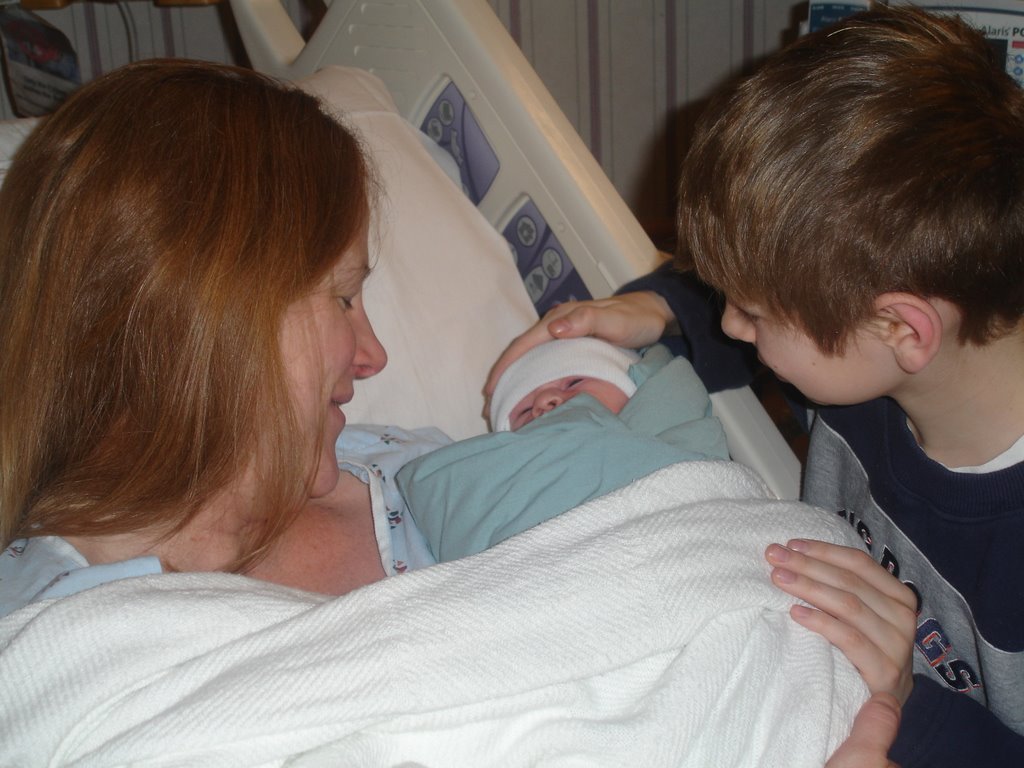
Mike & Toni Feltman are pleased to announce that Will (fka Mickey) Feltman is now a big brother! Will welcomed his new baby sister Leilani Taylor Feltman into the world at 6:01 am on February 1st. Release had been scheduled for February 4th, but in a surprise move, the Feltman's actually decided to release early.

Leilani weighs in at 7 lbs 11 ounces, is 21 inches long and has a very healthy set of lungs!

When asked about his new role as big brother Will Feltman said "I've enjoyed the long run I've had as baby of the family, but really, after 10 years, it was time for me to move on. I mean really, what took my parents so long? I'm ready for bigger and better things. Changing poopy diapers will not be among those bigger and better things. I'm looking forward to teaching Leilani about the finer things in life, like how to get exactly what you want from your parents. I'm also very happy that Leilani is a girl so that I can continue in my role as my Dad's 'best boy.'"

Leilani is in perfect health. Delivery was incredibly fast and without complication. Mother is recovering remarkably well and may come home with Leilani as early as today. Dad is already contemplating how he's going to keep the boys away from his beautiful new daughter.

The Feltman's would like to thank their friends and families and their extended families in the FoxPro community and at St. Martin de Porres Catholic Church for the love and support they've shown us throughout the pregnancy. Your thoughts, prayers and deeds have truly touched us. We are absolutely thrilled to bring Leilani into a world with so much love.

Love to All!

Toni, Mike, Will & Leilani

Tuesday, August 08, 2006

CWIZCRYSTAL

Crystal VFE 2.01 is now available. Please click here for details.

Wednesday, June 14, 2006

Taming Dockable Toolbars

Last night I spoke at LAFOX on docking in VFP. Before my session started Ken Leland approached me about a problem he has in his application that's come up with several customers of mine over the years and we've never really tracked down.

The problem is that occassionally a toolbar will become undocked and the end user claims they didn't move it or anything like that. In fact, this problem can occur even if the movable property of the toolbar is set to false. From looking at the various office applications, it appears standard Windows behavior is for a toolbar to doc itself when you doubleclick on an empty space in it, or in its titlebar. VFP decided to go one better than than and if you doubleclick on a toolbar or empty space in it (including on a separator), the toolbar will undock itself - even if movable is set to false. The result is that if a user misses a button in a docked toolbar by a pixel or two and clicks in an empty space, the toolbar will undock. Turning off this behavior is easy all you need is a little code like this in the dblclick method.


IF This.DockPosition <> -1
NODEFAULT
ENDIF


That'll tame your toolbar.

Saturday, May 06, 2006

Version Control in MS Word

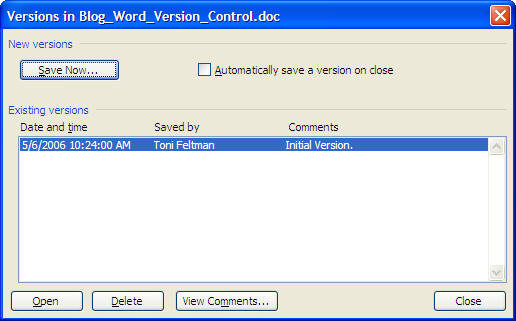
Did you know that Word has internal version control? I just stumbled across the feature this week. It is not team version control but it is version control for the individual user. I use Word 2003 and like I said, I just found this feature so I don’t know how long it has been there. How do you get at it? Well, off if the file menu, there is a Versions choice that brings up this dialog:


You can save as many versions of the document that you would like. Anytime you want to get back to them, you select the one you want and open it. Once the document is open, you can Save As another document and start editing that version. I did a little digging and found that all versions of the document are stored in the same DOC file and only the changes are saved in each version rather than the entire document.

I think I will definitely be able to use feature when writing my session white papers. On many occasions I have scrapped entire sections of the paper only to decide later that I really would like to include it. Pretty cool.

Congrats go out to YAG!

Once again Microsoft has seen the wonderful things that the Fox people (or past Fox people) are capable of and rewarded him. Yag has once again moved to a new and exciting position within Microsoft. The better news is that he will still have a firm hold on FoxPro. I can sleep much better at night knowing that Yag is watching my back.

Congratulations dude, you deserve it!

Friday, March 31, 2006

Key and Timestamp on VFP Tables

Twice in the last two months I have talked to someone getting errors because the modified fields list was too long in the data they were trying to save. The first person was using views and the second one was using Cursor Adapter. I know that the SYS(3055) function was added to help "work around" this issue. I am not sure how much memory this will use so I am not inclined to use it as a general solution. The problem has been around for many years so why couldn't MSFT just give us a Timestamp data type and we would be all set. Oh, I know why. Because then we wouldn't use SQL Server. :-)

When the first person asked about this problem, Mike and I talked about it and together we rolled a really good solution. I can't believe that we didn't think of this years ago. Here is what you need to do:

First: Add a datetime field named tUpdated to each of your tables. Or at least to the really wide ones.

Next: Add a stored procedure to the DBC where your tables reside. The stored procedure is very simple:

PROCEDURE NewTime
* Updates the datetime field of a cursor with the current
* date and time.
REPLACE tUpdated WITH DATETIME()

RETURN .T.

Third: Call the NewTime() function from the record level rule for each table with a tUpdated field. In case you are not familar with the record level rule, it is located on the Table page in the Table designer. The purpose is to validate a record before saving. I don't know about you, but I have use Valids for more non-validation code than actual validation code. So this is nothing new.

Finally: In your view or cursor adapter, set both the key and the tUpdated fields to be the key. Do not set the tUpdated field to be updatable. You also need to set the Where Clause to just Key Field.

Now, there are two additional things that you might need to deal with. The first is in VFE. A VFE cursor class doesn't like multiple field primary keys too much. So, even though the view uses the key and tUpdated field for the key, the cursor just needs to know about the real key. Therefore, you must set the cPrimaryKey property of your cursor classes to just the name of the key field. Then, the cursor class code won't ask the view what the primary key is.

The next problem is refreshing the tUpdated field. The field is modified in the table. Therefore, the old value will remain in the view until you requery or refresh it another way. In VFE you can simply set the lRefreshRowOnSave property on the business object to .T. If you are not using VFE, you can try to call the Refresh() function. Sometimes Refresh() works and sometimes it doesn't. If it does not work, you will have to retrieve the new tUpdated value from the table and update the view field with the new value.

I hope that this approach will save someone a headache.

xCase 8 - Wow!

Resolution has released Xcase 8.0. In my opinion, this is the most major upgrade to Xcase to date. I've been a big fan of Xcase for a long time; in fact, I was so impressed when I first saw Xcase that F1 Technologies ended up becoming a distributor.

Xcase has always been the most capable database design tool I've ever used, especially when it came to Fox data since it was the only real game in town. Previously I liked Xcase more for what it could do, then for how it did it. What I didn't like was the interface. It had more of a Windows 3.1 style interface that I found to be a bit dated, clunky and sometimes awkward.

Xcase 8.0 eliminates all of my concerns about its interface. What was ugly is now beautiful, what was awkward is now elegant, what was obscure is now easy to find. They've really done an amazing job with this upgrade. The workspace has been completely redesigned. It now has a very XPish interface, is easy to navigate, is snappier and well, it's just plain sexy. The toolbars have been updated with more standard icons and are customizable. The menus adhere to Windows standards. Dialogs have been consolidated into multi-tabbed browsers and so on.

The interfaces changes themselves more than justify the upgrade, but in addition to the new capabilities in the UI there are a number of other worthwhile enhancements. Most importantly Xcase 8 fully supports both SQL Server 2005 and MySQL 5. For SQL Server 2005 Xcase supports Schemas, Partitions, XML collections, XML Indexes, Index Included Columns, Description Extended Property, CLR Objects and much more. For MySQL 5 support has been added for triggers, stored procedures, functions and views.

For more information on Xcase 8 or to download a fully functional demonstration version visit http://www.f1tech.com/xcase. I will also be out and about demonstrating xCase 8 to various user groups this summer. If you’d like to arrange an xCase demonstration at your user group, contact me.

A list of new features can be found at http://www.f1tech.com/xCase/whatsnew.htm. New orders and upgrades can be placed at http://www.f1tech.com/orders.

Saturday, March 04, 2006

Linked Form Support in VFE

In my last blog entry I mentioned that we've added support for a new feature named "Linked Forms" to our Visual FoxExpress framework. Linked forms allows the developer to specify a form that's linked to a field or a view parameter. A linked form is specified by setting the "Linked Form Class Name" for the field or view parameter in the data dictionary.

When a field or view parameter has a linked form associated with it the label appears as a hyperlink. If the user clicks the label, the form object is created and a reference to the label is passed to the form's init method. If the form that contains the label has a DoChildForm method, then the linked form is creating using the DoChildForm method. If there isn't a DoChildForm method available then the Application Object's DoForm method is executed.

That's pretty much all this feature does out of the box. What happens in the linked form from there is up to the developer. There are a number of possibilities.

In some scenarios you may opt to do nothing in a linked form when it's called. If you're building your application using local tables and the table used by the linked form is open in the calling form's data session, the record pointer should already be position on correct record when the linked form is opened. If you're using the linked form as some type of lookup, perhaps you'd wait to have the user file in parameter values and then act when a record is selected.

A more common scenario will be to attempt to move to the data associated with the value of the field the linked form is tied to. Remember when the linked form is called an object reference to the label that made the call is passed. From that label, you can easily retrieve data or other properties and act on them. Here's some sample code that sets a parameter based on the label passed to the form and requeries:


*==============================================================================
* Method: Init
* Purpose: If a parameter is passed, search for a customer that matches
* it.
* Author: F1 Technologies
* Parameters: toParameter, Object, in this case a label object from the
* calling form.
* Returns: None
* Added: 02/01/2006
*==============================================================================
LPARAMETERS ;
toParameter

IF PCOUNT() = 1
This.oPresentObj.oBizObj.Search(toParameter.oField.Name, toParameter.oField.Value)
ENDIF
DODEFAULT(toParameter)

* Clear the object reference held in the parameter so we don't have a reference
* to an object in another form hanging around.
This.oParameter = NULL


This example works with a form that is based on a small view that will have already retrieved all of its data automatically by the time the form's init method is called, so all we do here is call the business object's search method to position the record pointer on the appropriate record. If we were working with parameterized data we could've just as easily set a parameter and then requeried.

The most important line in the example is This.oParameter = NULL. By default, when a parameter is passed to a form the parameter is stored in the form's oParameter property. In the case of linked forms, this will be an object reference to a control in another form. This object should reference should always be nullified before the form is destroyed. If you're using a non-modal form, as I was in this example, it's more or less required to release this reference at or near the end of the Init method. If this object reference is left in place and the calling form is subsequently released VFP isn't very happy about it and eventually it will let you know in the form of a crash. If the Linked Form is modal the framework takes care of clearing the oParameter property when the form is destroyed, but it is probably still best to take a cautious approach to this and release the object reference as soon as its no longer needed.

This was a relatively easy feature to implement, but it can be quite powerful. I'm making use of it in several places in the new sample application and someday in the near future we'll actually make that available. In the meantime, give it a whirl. It's pretty straightforward.

Integrated Upates Posted for VFE

Yesterday we posted another set of integrated updates for VFE. The following describes what class libraries were changed and what the changes were. Thanks to Steve Derzi and Troy Neville for finding a few of the issues we've addressed with this update and testing the changes.

Class Library: cVFEMgr

cVFEManager

Changes were made to several methods to eliminate potential runtime errors if the iId fields get out of sync between VFEMeta and Coremeta.
Changes were made to force the iIds to remain in sync between VFEMeta and Codemeta for index records. Occassionally the ids were not updated in VFE which caused a runtime error in cCursor.CreateIndexes()

Class Library: cUtils.

cGlobalHook

Some previously commented out code was deleted.

Class Library: cToolbar

cToolbar
The refresh method was changed so that controls within the toolbar were not always automatically enabeld when the toolbar was refreshed. This change was necessary to enable proper disabling of toolbars not associated with a modal form when the form is open.

Class Library: cSecure

cUsersPresObj

The PopulateGroupsMethod was changed to make use of the groups cursor directly. In the 1/13/06 build we modified security so that all of the presentation objects are loaded using delayed instantiation. This change made it possible to load a different presentation object from the i-layer if desired. This change caused the groups cursor to not open until the groups page has been activated.
We also changed the UIEnable method of the cboGroup_Id combobox to automatically requery when the page is activated. This ensures it reflects all currently available groups.

cUsersEnvironment
An instance of the cGroupsCursor class was added to this data environment to ensure that the groups cursor is available when necessary.

Class Library: cOle

cListViewSelector

The class was created to allow selecting the view in an associated ListView control.

cListView
The OnRowChange_Perform method was modified to check for pending changes in a data entry cursor and act accordingly.
The SetItem method was modified to append an _ to the begining of the key before searching, which makes it function properly.

Class Library: cContrls

cLabel
The modifications made to cLabel were made to support a new feature: Linked Forms. I'll write up a separate entry about linked forms in the near future.

cGrid
The OnRowChange_Perform method was refactored based on some conversation in the forums.
A new method, GetCursorForGrid was added that returns an object reference to the cursor object associated with the grid.
In the BeforeRowColChange method we sdded code to prompt the user to save when a data entry and list cursor business object is in use with the grid and there are changes pending in the data entry cursor.

Class Library: cCustFrm
A couple of minor nits not worth going into detail over were addressed in this class library.

Class Library: cData

cField
Support was added for fields in local VFP tables to the CheckUnique method.

cViewParameter
Corrected an issue with the Auto Foreign Key (lFKParam) property in value_access.

cCursor
Added a few checks to ensure that all of the necessary property values retrieved from DBCX are present before trying to create an index.

Class Library: cDataTree

cDataTree
Changed the LoadBizObj method to better take advantage of business objects that have already been instantiated.

Class Library: cForms

cBaseForm
Added code to enable/disable the main toolbar in the activate method based on the modality of the form.

cPresentObjForm
Added code to only refresh the main toolbar when it is enabled.

Saturday, February 18, 2006

Up All Night with AFP

No, I didn't pull an all nighter and stay up writing AFP code. :) I can't remember the last time I pulled an all nighter coding. 3:00 AM is my limit nowadays and that's pretty rare.

Anyway, my Waking Up AFP blog entry got an immediate rise out of Chrisof at Prolib, the author of AFP. I kind of figured it would. :)

AFP has a lot of configuration options and of course, how long it stays up and running on the server is one of the things you can configure.

So, here's what Christof had to say about it:

The default configuration is to shut down an engine when it's been idle for 15 minutes or has processed 2000 hits (to avoid memory problems). You can change that in the afp.config file (or in the ControlCenter):

max-idle="900" max-uptime="0" max-hits="0"

max-uptime defines that an AFP engine stops when it has been running for the specified number of seconds, no matter how many hits it processed or how long it has been idle. These settings define how AFP shuts down engines.

A second set of parameter specifies how AFP deals with starting engines:

threads="4" min-threads="0" max-threads="4"

The default configuration tells AFP to start 4 engines when it starts up. On demand AFP launches up to a total of four engines (it starts with the maximum number), AFP monitors that the number of engines never goes down below zero (that is, all engines can terminate). If you change the min-threads value to "1", AFP always keeps one instance running. Together with the max-idle setting, this would cause AFP to restart the egine every 15 minutes, but always keep one available for fast response times. You can increase the max-threads value to increase reaction time for higher request rates. The recommended value is four times the number of processors on your machine. The best value depends on a number of factors and is best determined by experimenting.

There's a whole multi-threading infrastructure in AFP.

Thanks for setting me straight Christof!

Friday, February 17, 2006

Waking up AFP in the background

I’m in the final stages of the development of a commercial website that was built using AFP. I’ve been really pleased with how well AFP has worked for this site and its performance. Because AFP is VFP, obviously its data handling capabilities are superb. I’ve found this to fit in really well with AJAX style applications because typically server side scripting is handling data intensive operations.

One caveat to using any VFP technology for server side scripting is its load time. So, of course, this applies to AFP. If AFP hasn’t done anything in a while, it shuts down. That means that when you hit an AFP page, AFP has to be loaded. AFP loads the VFP runtime and this seems to be by far the biggest bottleneck in its startup time. So basically the amount of time it takes to load AFP is roughly equivalent to the amount of time it takes VFP to load, AFP then has to process the page the user navigated to and then lastly, the page is returned to the browser. The end result of all this is that the first time a user hits an AFP page on your server (when AFP isn’t already running) is slow.

I decided to deal with this by stealing a few techniques from my AJAX functions. It’s pretty simple really, in the onload event of non AFP page (which is my home page), make an XMLHTTP call to open a dummy .AFP page in the background. This starts AFP while the user is viewing the page. By the time they click on a link to an AFP page AFP is already up and running and then the performance is of course, snappy.
I always have trouble getting code to format in the blog, but here it goes.
First, in the body section of your page add onload=”LoadAFP()”. This code tells your browser to execute this function after the page has loaded.

Now, if you want to avoid an error, you need a LoadAFP function. You can place it in a .js file and simply reference the file, which I’d recommend if you’re going to do this in more than one page or you can place it in the heading section of your page. Here’s the code for that, sans the script tags which Blogger will eat.

function LoadAFP() {
var xmlhttp;
/*@cc_on
@if (@_jscript_version >= 5)
try {
xmlhttp = new ActiveXObject("Msxml2.XMLHTTP");
} catch (e) {
try {
xmlhttp = new ActiveXObject("Microsoft.XMLHTTP");
} catch (E) {
xmlhttp = false;
}
}
@else
xmlhttp = false;
@end @*/
if (!xmlhttp && typeof XMLHttpRequest != 'undefined') {
try {
xmlhttp = new XMLHttpRequest();
} catch (e) {
xmlhttp = false;
}
}
xmlhttp.open("GET", "http://www.f1tech.com/afploader.afp", true);
xmlhttp.send(null);
}

Basically this function just creates the xmlhttp object – which is complicated due to browser differences. In ie7 (currently in beta), it’ll be native to the browser like it is currently in modern Mozzilla based browsers, but it’ll be a long time before you can just count on it being present. Once you’ve got a reference to an xmlhttp object, the last two lines are one loads AFP in the background. Make sure you change the URL to something on your own server. Starting AFP on mine won’t help your performance. BTW, I didn’t include any code for afploader.afp because it can be any old AFP page. I didn’t test this, but I’d suspect it doesn’t even have to include and AFP script. AFP is invoked on the server whenever a request is made for a file with a .AFP extension.

I also played around with another variation of this that might be more appropriate if you're using AFP on your home page. Basically, the idea is to make a dummy homepage that just says something like "Server idle, loading website..." and then in your onload section just call a oneline javascript function that reads:

function LoadAFP() {
window.location="YourAFPHomePage.AFP"
}

This approach displays the server idle message for as long as necessary, then displays your home page. If AFP is already loaded it jumps to the homepage immediately.

Neither of these techniques take a lot of effort or are difficult to implement, but I think they can really make a difference for visitors to your website.

Thursday, February 02, 2006

To GMT or to not GMT

Toni and I are currently working on a project that has had as many as 9 developers working on it at one time, working from as many as four different locations, plus some developers also working from home. As a result, we've been doing a lot of work on VFE in recent months to make it more friendlier for team environment. One of the things we added to DBCX recently was the ability to write all of the metadata for a DBC out to an XML file and to load metadata from this XML file. This lets developers check in and check out individual DBCs and makes it easier for other developers to get their data dictionary changes without having to check in or check out the meta data for the entire project all at once. The project we're on currently has 47 DBCs, so you can imagine there's a lot of meta data as well.

Anyway, in working on this, I discovered that I needed to make sure that I properly dealt with different time zones. One of the offices is on West Coast time and well, Toni and I are likely to login from any number of time zones - and seeing as its February in Toledo right now, Hawaii Time sounds about perfect. So, in order to avoid any confusion related to timezones, I built the mechanisms for checking date and time of the changed metadata around GMT - Greenwich Mean Time. In a nutshell, in GMT it's always the same time everywhere in the world, no matter what time zone you're in - even if you're in Indiana or New Foundland. For more info on GMT, check this out.

I haven't done real well with posting code in the blog, so I put a file of the GMT related functions here.

There are 4 functions in this procedure file:
  • GMTDateTime() - which returns the current GMTDateTime. There's a Windows API call to get this.
  • GMTTimeDifference() - which returns the difference in seconds between the machine's local time and GMT. This function is used internally for the remaining functions.
  • GMTToLocal(ltDateTime) - which converts GMT a to its local equivalent.
  • LocalToGMT(ltDateTime) - which converts a local date & time to its GMT equivalent.
The code is commented pretty well, so I won't bore you with the details here.

This really got me thinking, should my applications be storing dates and times in GMT and then converting it to the current users local date and time for display purposes? It'd really depend on the application, but this is definitely something that I plan on giving somethought with my next application. Most of the time when we look at a date and time, we think of it in terms of our current locale, this could be a big issue in apps where the data comes from multiple locations and of course in web apps, where the users could be logging on at any time from any where.

So, I don't really have any guidelines or recommendations at this point for when GMT should or should not be used. If you have any, let me know. It's definitely something worth more thought.

Tuesday, January 31, 2006

The Good, The Bad, and The Code

The good:

Most of you don't know the history, but I am so excited by the latest news that I have to blog about it. Last March my mom was diagnosed with lung cancer. Yes, she was a smoker but has not smoked in close to 20 years. Of course we were all very nervous. She went through chemo and radiation and finished up at the end of 2005. She received MRI results last week telling her that her tumors were gone! Wow are we relieved.

The bad:

Well, I will not be participating in the half time show at the big game on Sunday after all. As it turns out, there was some confusion and our group leader did not get all of the paperwork in on time and we were cut. Oh well. I can sit in an easy chair and watch the game like the rest of the world. It will be just as fun and I don't have to break our family tradition of "junk food day."

The code sample:

The following code sample is really simple. There are many simple things that we could do to improve our development environment that we don't because we don't want to take the time. Well, I took the 5 minutes needed to put this together and I hope that somone else will find it useful.

Not long ago, Rick Schummer posted some tips on the Class Browser. After reading the entry, I was compelled to start using the class browser more. All of my attempts seemed clumsy. I was either stumbling on typing the library name (DO (_browser) WITH ....) or fumbling around trying to find the library when I used the Open button. So, I wrote this very little program to help me. The Class Browser feels so much better to me now.

LOCAL ;
    lcVCX AS Character

lcVCX = GETFILE('VCX', 'Select Class Library')

IF NOT EMPTY(lcVCX)
    DO (_BROWSER) WITH lcVCX
ENDIF


I load this program in my Task Pane Enviroment Post Scripts using:

ON KEY LABEL ALT+F2 ;
    DO c:\development\devtools\LoadClassInBrowser


Enjoy!

Thursday, January 26, 2006

Customized View Editor

I cannot believe that I forgot to document one of the coolest new features in the latest version of Visual FoxExpress, customized view editors in DBCX!

When a view is selected in DBCX Explorer and Modify is chosen from either the toolbar or right-click menu, the normal behavior is to open the Visual FoxPro View Designer. Well, we can now incorporate other behaviors. If a program named ModifyView exists somewhere in the application path, that program is used to modify the view rather than the VFP View editor.

The ModifyView program is passed the name of the view that is selected in DBCXExplorer. Therefore, you could have a ModifyView program like the one below to run your favorite view editor program.

* Program ModifyView
LPARAMETERS ;
    tcView

DO C:\development\devtools\MyFavoriteViewEditor WITH tcView

I hope that you think that this enhancement is as cool as I do!

Friday, January 20, 2006

Version Control Rocks

One thing I forgot to mention when I was ranting about grid.optimize, is that version control rocks. Toni and I were sort of late adapters of version control, but it amazes me how many developers still don't use it. I used to be one of them. I was stupid.

Looking at a Diff of the cContrls class library is what got me looking into the optimize property. Troy, the customer who encountered this problem, had already told me that it doesn't occur with our August release of VFE. We've checked in changes to this class library over a dozen times since August, but I was able to view a Diff between the current version and the August release and easily identify the change. Without version control, this change history would've been lost or taken a helluva lot more time to dig up and wade through.

One of the things that made this easy was that Toni and I create VCA files for all class libraries at the time of check in. I work on a project where most of the other developers don't and it sucks. It takes about a second to make a VCA file, but if you don't make them at the time of check in, then you have to make a VCA file for the file you're working with, copy it off somewhere, get the class library for the version you want to compare to from source control, then make the VCA for it. If you've got changes you don't want to check in you also have to copy them out to another location first. By the time you're finished with all of the copying you've usually forgot what you were going to look for, so it's best just to make the VCA files all of the time.

BTW, we used a revised version of SCCTEXT to get around some of its limitations. For more info, check out the SCCTEXT topic on the wiki.

I have a little PRG I use to make my VCA files, so I don't have to do it manually for each VCX file I have checked out. (SCX's are for sissies, but you can add support to it for them easyily enough.) Here it is:


*==============================================================================
* Procedure: VCAAll
* Purpose: Makes a .VCA file for every VCX file that is missing one
* in a directory and for every existing VCA file that's not
* readonly.
* Also packs .VCX file first so that smaller files can be
* checked in and checked out.
* Author: F1 Technologies
* Parameters: None
* Returns: None
* Added: 01/20/2006
*==============================================================================
LOCAL ;
lcDirectory, ;
lnI, ;
lcVCA, ;
lcClassLib, ;
llGen

LOCAL ARRAY laFiles[1]
lcDirectory = ADDBS(GETDIR())
FOR lnI = 1 TO ADIR(laFiles,lcDirectory + [*.VCX])
lcVCA = lcDirectory + JUSTSTEM(laFiles[lnI,1]) + [.VCA]
DO CASE
CASE NOT FILE(lcVCA)
llGen = .T.
CASE NOT [R] $ laFiles[lnI,5] && VCA is not readonly, assume checked out.
llGen = .T.
OTHERWISE
llGen = .F.
ENDCASE
IF llGen
lcClassLib = lcDirectory + laFiles[lnI,1]
CLEAR CLASSLIB (lcClassLib)
USE (lcClassLib) EXCLUSIVE ALIAS ClassLib
TRY
PACK
USE IN CLASSLIB
DO (_SCCTEXT) WITH lcClassLib
CATCH
ENDTRY
IF LASTKEY()=27
EXIT
ENDIF
ENDIF
NEXT


I hang this program off of my utilities menu and when I'm ready to check files in to version control I just run it on the directory I'm working on. I'd be easy enough to make it walk several directories, but I really haven't had a need for it.

Enjoy, and let me know if you improve on it.

Happy Birthday to Two


Hey, while I'm blogging I might as well wish a happy Birthday to two of the most important people in my life: William Michael Feltman the 1st and William Michael Feltman the 3rd. That's right, today my Dad turns 70 and Mickey is a whopping 9 years old already - double digits are just around the corner.

So...

Happy Birthday Dad & Mickey!


39 is just around the corner for William Michael Feltman the 2nd on February 2nd. Apparently I'm about to embark on my last year up the hill!


VFP Grid.Optimize Gotcha

A new optimize property was added to grid's in VFP9. When this property is set to true, the grid uses Rushmore optimization. For backward compatability, this property defaults to false in the VFP grid base class. Seeing as Rushmore optimization is a good thing, we set it to true in the cGrid class in VFE which is the base grid class in the framework.

We've been shipping VFE this way since August and it hasn't seemed to be an issue - except for one customer. This customer has been consistently getting a "Uniqueness of index xxxx is violated" error whenever the user enters a duplicate value in a textbox that's bound to a primary or candidate key AND there's a grid bound to the same table is also visible.

I've been looking all over for changes we've made to framework code, as there's been a fair amount of work done in grids recently, and it turns out, it's just a simple property setting. This situation only occurs when the user is doing data entry directly into tables (as opposed to views), the user can edit a primary or candidate key and there's a grid that's visible at the same time. When the user exits the control (generally a textbox) associated with the primary or candidate key and VFP updates it, it also tries to refresh the grid at that point in time and this is when the error occurs. What's really confusing about the whole thing is that no events fire that you can see, so what exactly is happening at this point in time took a while to unravel. At any rate, the moral of the story is that if you've got primary or candidate keys that the user can enter, you bind directly to table fields and you display this data in a grid, it's probably best to set the optimize property of the grid to false. If this is how you build your VFE apps, it'd be wise to set this property to false in iGrid of iContrls.

Oh, and BTW, if you do RTFM, there's a note in the doc for the optimize property that explains this:

As with any data manipulation command that can impact Rushmore optimization, you should be aware that actions taken against the Grid's data source could result in behavior that differs from when the Optimize property is set to False (.F.). For example, Rushmore optimization might trigger an implicit TABLEUPDATE to occur for a row buffered cursor. And an error may or may not occur depending on whether the record is blank or whether the cursor is a view.

Now that I've encountered this scenario, I actually understand what the note refers to!

I lost some hair on this one, hopefully this'll save somebody else from early baldness.